Guide · Getting started
How Shuffle works, from sign-up to cash-out.
Most problems with crypto sportsbooks happen in the first hour: the wrong network, no 2FA, no limit set. Here is how to avoid all three.
Three checks before you sign up
- Your country is allowed. Shuffle blocks the US, the UK, Germany, the Netherlands, Spain, Australia and others. A VPN breaks its terms and can cost you your balance.
- Your local law allows offshore betting. That is your responsibility, not the operator’s.
- You have decided your limit. Pick a monthly amount you can afford to lose before you deposit anything.
Opening an account
Registration asks for the basics. Choose a password you use nowhere else and switch on two-factor authentication in the security settings as soon as you are in, if it is offered. Save the official address as a bookmark and always arrive that way — cloned sportsbook pages are one of the most common ways accounts get emptied.
Funding it: pick the right network
Shuffle takes BTC, ETH, LTC, SOL, USDT and its own SHFL token, plus cards, Apple Pay and Google Pay. The network you choose decides how quickly money moves later:
| Coin | Things to watch | Typical withdrawal in tests |
|---|---|---|
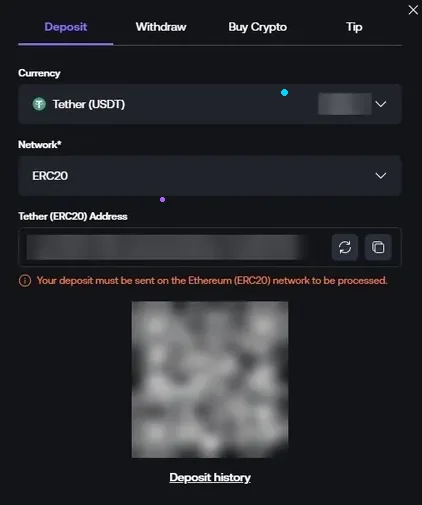
| USDT | Several networks exist — send only on the one the deposit screen shows | ≈ 1 minute (TRC-20) |
| LTC, SOL, ETH | Low fees on LTC and SOL; ETH fees vary with network load | under 10 minutes |
| BTC | Slowest to confirm | 30–40 minutes |
Withdrawal times come from published tests listed in our review. On your very first deposit, send a small test amount.
Two ways in: Deposit or Buy Crypto
Everything starts from the Wallet button in the header. The window that opens has four tabs — Deposit, Withdraw, Buy Crypto and Tip — and which one you use depends on whether you already hold coins.
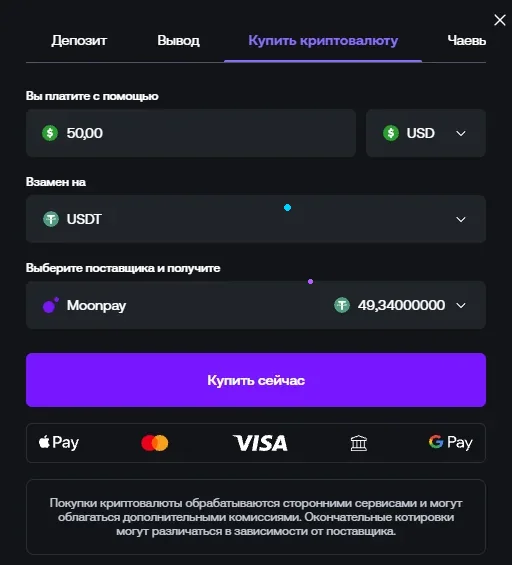
The convenience has a price. In our example Moonpay offered 49.34 USDT for $50 — roughly 1.3% lost to the rate and provider fee before you place a single bet. Shuffle itself notes that purchases go through third-party services with their own fees and quotes, so compare the amount you would receive across the providers in the drop-down. For regular top-ups, buying crypto on an exchange and sending it via the Deposit tab is usually cheaper.
Placing a bet
Pick an event, tap a price to add it to the slip, enter a stake and confirm. In-play prices move fast, so check how your slip handles odds changes before you rely on it. If decimal odds are new to you, read Betting odds explained first.
Cashing out
Open the wallet, choose the coin and network, paste your own address and confirm. Large or unusual withdrawals can trigger an identity check, so it is worth knowing what documents you would provide. Make your first withdrawal a small one to confirm the route works.
Five mistakes new players make
- ✓ Sending USDT on the wrong network.
- ✓ Skipping two-factor authentication.
- ✓ Using a VPN from a blocked country.
- ✓ Betting more to reach the next VIP level — see why that backfires.
- ✓ Keeping the whole balance in a volatile token instead of a stablecoin.
Ready when you are
Sign up through our affiliate link — we earn a commission, your terms stay the same. 18+